Photo and Signature Size for Government Exams: SSC, UPSC, IBPS, RRB, NEET
Official photo and signature sizes for SSC, UPSC, IBPS, RRB and NEET forms in one table: KB limits, dimensions, live photo rules and source links.
Most government exam forms want a JPG photo of 20 to 50 KB and a JPG signature of 10 to 20 KB, but SSC and RRB now take a live photo instead of an upload, and UPSC and NEET allow much larger files. The exact numbers for each exam body are in the table below, taken from the official notifications.
|
Exam body |
Photo |
|---|---|
|
SSC (CGL, CHSL, GD, MTS) |
Live capture in the form; no upload |
|
UPSC (CSE, NDA, CDS, CAPF) |
JPG, 20-200 KB, plus a live photo |
|
IBPS (PO, Clerk, SO, RRB) |
JPG, 20-50 KB, 200 x 230 px, plus a live photo |
|
RRB (NTPC, Group D, ALP, JE) |
Live capture in the form; no upload |
|
NEET UG (NTA) |
JPG, 10-200 KB, plus a live photo |
Specs change between notifications. Before you upload, open the notification for your own exam and year and check the numbers on the upload screen.
Need the file ready now? Use the Photo & Signature Resizer to set the dimensions and KB limit in one step.
SSC exams (CGL, CHSL, GD, MTS, CPO)
SSC no longer accepts an uploaded photo. The application module takes a live photograph through your webcam or phone camera, and you upload only a scanned signature.
|
Item |
Requirement |
|---|---|
|
Photograph |
Captured live inside the form; no file to upload |
|
Signature format |
JPEG / JPG |
|
Signature file size |
10 KB to 20 KB |
|
Signature dimensions |
About 6.0 cm wide x 2.0 cm high |
Source: SSC CGL 2026 notice and SSC CHSL 2026 notice.
Rules for the live photo:
- Sit in good light against a plain background, with the camera at eye level.
- Keep your whole face inside the red rectangle shown on screen.
- Do not wear a cap, mask or spectacles.
- Do not point the camera at a printed or saved photo. SSC rejects such applications.
Some SSC notices mention a signature of 4.0 cm x 2.0 cm in one place and 6.0 cm x 2.0 cm in another. The 2026 CGL and CHSL notices use 6.0 cm x 2.0 cm in the main instructions, so check the upload screen of your own form before resizing.
If the camera does not open on a computer, the form shows a QR code that lets you take the photo from your phone.
UPSC exams (Civil Services, NDA, CDS, CAPF)
UPSC asks for both an uploaded passport photo and a live photo, and the two must match. The signature rule is unusual: you sign three times on one sheet.
|
Item |
Requirement |
|---|---|
|
Photo format and size |
JPG, 20 KB to 200 KB |
|
Face coverage |
Face fills at least three-quarters of the photo |
|
Live photo |
Mandatory; taken by webcam or by scanning a QR code with your phone |
|
Signature |
Three signatures, one below the other, black ink on plain white paper, scanned as one image |
|
Signature format and size |
JPG, 20 KB to 100 KB |
|
Signature dimensions |
350 to 500 pixels |
Source: UPSC instructions for uploading photo and signature.
Points that catch candidates out:
- If the live photo does not match the uploaded photo, the portal does not let you continue.
- The uploaded photo should be recent. UPSC notices say it must not be more than 10 days old on the day applications open (ESE 2026 notice).
- Do not sign the photograph.
- Older UPSC notices and FAQ pages mention a 300 KB limit for both files. Notices issued in 2026 use 200 KB for the photo and 100 KB for the signature, so follow the newer numbers.
Bank exams (IBPS PO, Clerk, SO, RRB)
IBPS forms need four scanned images, and the portal does not let you move to the next step until each one meets its limit.
|
Upload |
Dimensions |
File size |
Notes |
|---|---|---|---|
|
Photograph |
200 x 230 px (4.5 cm x 3.5 cm) |
20-50 KB |
Recent passport-style colour photo, JPG |
|
Signature |
140 x 60 px |
10-20 KB |
Black ink on white paper, not in capital letters |
|
Left thumb impression |
240 x 240 px at 200 DPI (3 cm x 3 cm) |
20-50 KB |
Black or blue ink on white paper |
|
Handwritten declaration |
800 x 400 px at 200 DPI (10 cm x 5 cm) |
50-100 KB |
In your own handwriting, in English, not in capital letters |
Source: IBPS CRP PO/MT-XV notification, Annexure III and IBPS CRP SPL-XVI notification.
The declaration text to write by hand is:
I, _______ (Name of the candidate), hereby declare that all the information submitted by me in the application form is correct, true and valid. I will present the supporting documents as and when required.
Other IBPS rules:
- Recent IBPS forms also capture a live photograph through your webcam or phone during registration.
- Scan at 200 DPI or higher, in true colour.
- Certificates such as the Class 10 certificate go up as an A4 PDF of 500 KB or less.
- If the signature on your call letter or attendance sheet does not match the uploaded one, you can be disqualified.
SBI and other bank recruitments run on the same IBPS-style portal and usually follow the same four-image pattern, but confirm the numbers in the SBI advertisement for your post.
Railway exams (RRB NTPC, Group D, ALP, JE)
RRB notifications issued in 2025 and 2026 take a live photo inside the form, so the only image you upload is your signature.
|
Item |
Requirement |
|---|---|
|
Photograph |
Live image captured by webcam or phone front camera; no upload |
|
Signature format |
JPG / JPEG |
|
Signature file size |
Between 30 KB and 49 KB |
|
Signature dimensions |
At least 140 x 60 px, scanned at 100 DPI or more |
|
Signature box on the form |
35 mm wide x 20 mm high, signature centred |
|
Ink and style |
Black ink on white paper, running handwriting |
|
SC/ST certificate (for the free travel pass) |
PDF, up to 400 KB |
Source: RRB CEN 01/2026 and RRB CEN 04/2025 FAQs.
RRB rejects signatures written in block, capital or disjointed letters, and applications where the live photo is a picture of an existing photo.
Notice the narrow range. A signature compressed to 20 KB for an SSC or IBPS form is too small for RRB, which wants at least 30 KB. Keep a separate file for each form.
Notifications from 2024, such as NTPC CEN 06/2024, asked for an uploaded photo of 30 to 70 KB. If you are completing an older cycle, follow that notification.
NEET UG (NTA)
NEET allows the largest files of the five, and it asks for finger and thumb impressions of both hands. The numbers below are from the NEET UG 2026 bulletin; NTA has not yet published the 2027 bulletin.
|
Upload |
Format |
File size |
Notes |
|---|---|---|---|
|
Passport-size photograph |
JPG / JPEG |
10-200 KB |
White background, face about 80% of the frame, ears visible, no mask |
|
Live photograph |
Captured in the form |
Not applicable |
Webcam, or phone through the on-screen QR code |
|
Signature |
JPG / JPEG |
10-100 KB |
Clearly legible |
|
Left and right hand finger and thumb impressions |
JPG / JPEG |
See note |
Must be clear, or the form is rejected |
|
Class 10 certificate and marksheet |
|
50-300 KB |
|
|
Category certificate, if applicable |
|
50-300 KB |
|
Source: NEET (UG) 2026 Information Bulletin.
The 2026 bulletin gives two ranges for the finger and thumb impressions: 10 to 200 KB in one place and 50 to 300 KB in another. A file between 50 and 200 KB satisfies both.
Two more things to prepare:
- The photo had to be taken after 1 January 2026 for the 2026 form. Expect the same rule with the new year in 2027.
- The postcard-size photo (4 x 6 inches) was not an upload in 2026. Keep 4 to 6 printed copies with a white background for the admit card and counselling.
How to resize your photo and signature
Get the dimensions right first, then bring the file size into the allowed range. Doing it in the other order usually leaves the file blurry.
- Sign on plain white paper with a black pen, or take your photo against a plain light wall in daylight.
- Photograph or scan it straight on, with no shadow across the paper.
- Open the Photo & Signature Resizer and add the image.
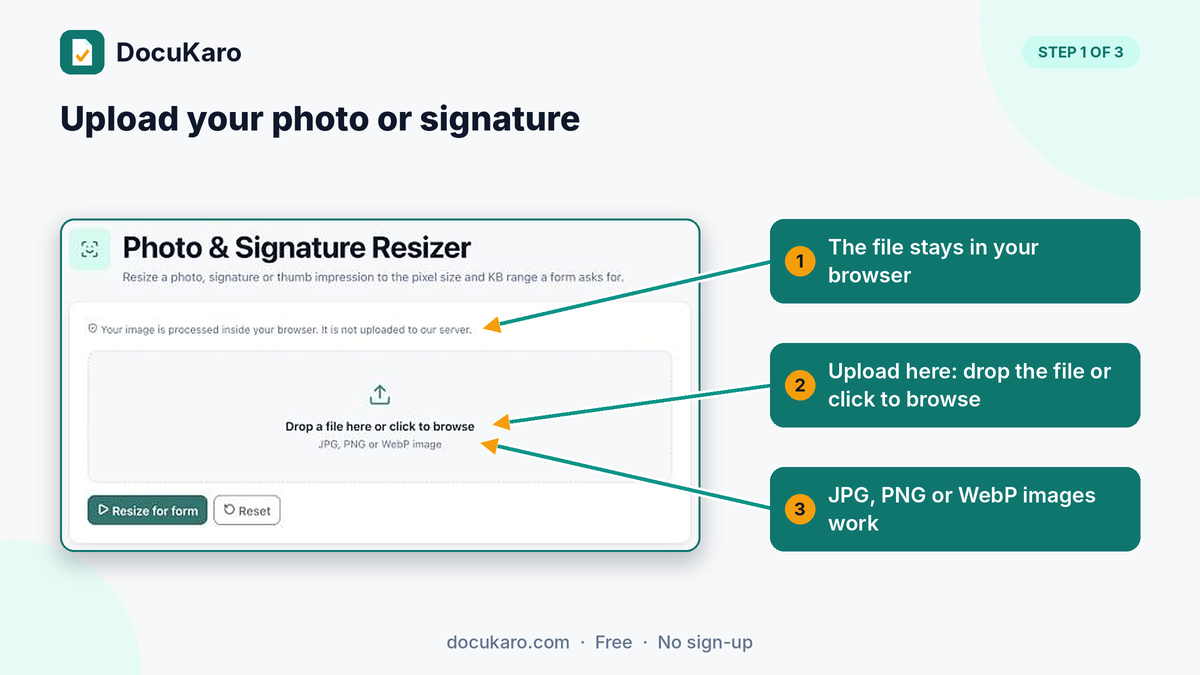
- Crop tightly, so the signature or face fills the frame.
- Under "Form / document type", pick your form, for example "SSC — Signature 6.0 × 2.0 cm, 10–20 KB". The width, height and KB limits fill in automatically. For RRB or NEET, choose "Custom size" and type the numbers from the table.
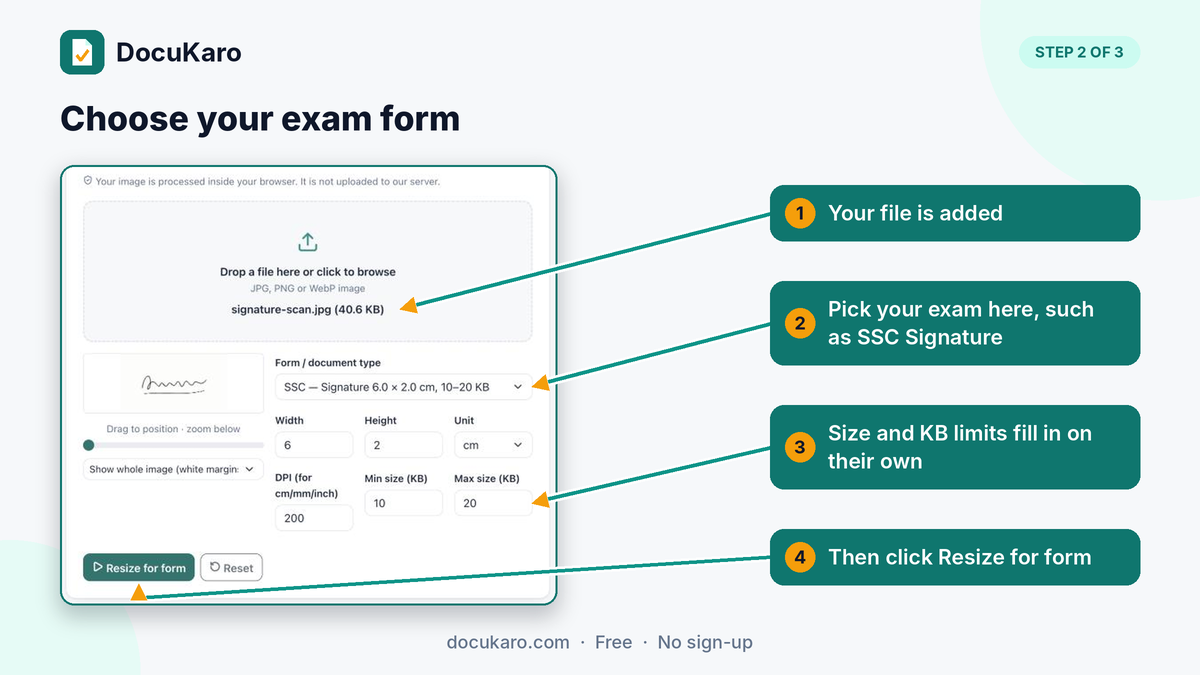
- Click "Resize for form". The result shows the final dimensions and file size against the allowed range.
- Download the JPG and check its size and dimensions in the file properties before uploading.
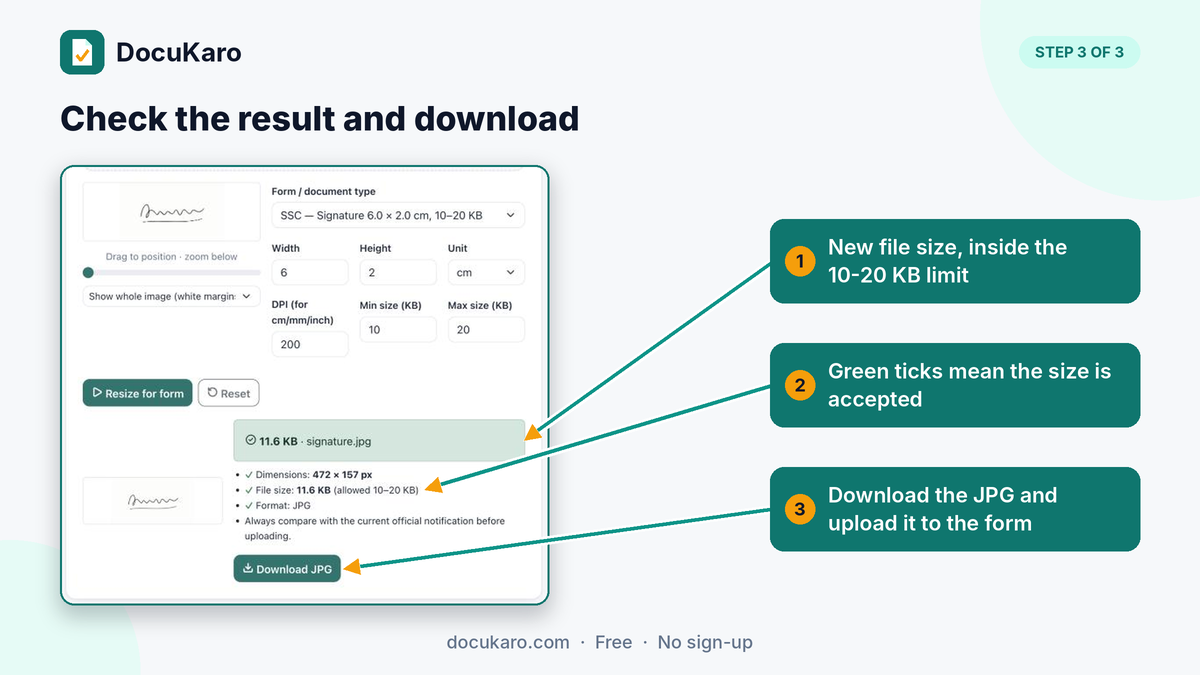
If the form gives centimetres and your tool wants pixels, multiply the centimetres by the DPI and divide by 2.54. At 200 DPI, a 6.0 x 2.0 cm signature is about 472 x 157 px, and a 3.5 x 4.5 cm photo is about 276 x 354 px.
Other tools for the same form:
- Compress Image to KB when only the file size is wrong.
- HEIC to JPG when an iPhone photo will not upload.
- Compress PDF to KB for certificates with a 300 KB or 500 KB limit.
- JPG to PDF when a certificate photo has to go up as a PDF.
Your files are processed in your browser and are not uploaded to a server.
Related guides: How to Resize a Signature for Government and Exam Forms, How to Resize a Photo to 20 KB, How to Compress a PDF to 200 KB.
Why uploads get rejected, and the fix
Most rejections come from a file that is outside the size range or a signature in the wrong style, and each has a quick fix.
|
Problem |
Why it happens |
Fix |
|---|---|---|
|
"File size too large" |
Phone photos are 2 MB or more |
Reduce the dimensions first, then compress to the target KB |
|
"File size too small" |
The file was compressed below the minimum, such as under 30 KB for RRB |
Export again at a higher quality or slightly larger dimensions |
|
"Invalid format" |
The file is PNG, HEIC or PDF |
Convert to JPG; renaming the extension does not work |
|
Blurred or miniature signature |
The scan was not cropped, so the signature is tiny in the frame |
Crop tight to the signature before resizing |
|
Signature in capital letters |
IBPS and RRB do not accept block or capital-letter signatures |
Sign again in running handwriting |
|
Live photo rejected |
Cap, spectacles, mask, poor light, or a photo of a photo |
Retake in daylight against a plain wall, face inside the guide box |
|
Photo and signature swapped |
Each was uploaded in the other's slot |
Check the preview before final submission |
|
Uploaded photo does not match live photo (UPSC) |
The uploaded photo is old or heavily edited |
Use a photo taken in the last few days |
Always open the preview or print view before you submit. SSC and IBPS both tell candidates to check the uploaded images there, and most portals do not allow changes after final submission outside the correction window.
Frequently asked questions
What is the photo size for government exam forms?
There is no single size. IBPS asks for a 20-50 KB JPG of 200 x 230 pixels, UPSC allows 20-200 KB, and NEET allows 10-200 KB. SSC and RRB capture a live photo in the form, so there is no photo file to upload.
What is the signature size for SSC, IBPS and RRB?
SSC wants a JPG of 10-20 KB, about 6.0 x 2.0 cm. IBPS wants 10-20 KB at 140 x 60 pixels. RRB wants 30-49 KB and at least 140 x 60 pixels.
Can I use the same signature file for every exam?
No. A 15 KB file that suits SSC and IBPS is below RRB's 30 KB minimum, and UPSC needs three signatures in one image of 20-100 KB. Sign once on paper, then export a separate file for each form.
Do I need to upload a photo for SSC exams?
No. The SSC application module takes your photograph live through the camera. You only upload the signature.
How many pixels is a 3.5 x 4.5 cm photo?
At 200 DPI it is about 276 x 354 pixels. At 300 DPI it is about 413 x 531 pixels. If the form states pixels, use the form's numbers.
Can I sign in capital letters?
Not for IBPS or RRB. Both state that signatures in capital or block letters are not accepted. Sign in running handwriting on every form to be safe.
Which ink should I use for the thumb impression?
IBPS accepts black or blue ink on white paper for the left thumb impression. The signature itself should be in black ink.
Is it safe to resize my photo and signature online?
It depends on the tool. DocuKaro processes the image in your browser, so the photo and signature are not uploaded to a server.
Sources
All numbers in this article come from official notifications, checked on 14 November 2026.
- SSC: Combined Graduate Level Examination 2026 notice, CHSL 2026 notice
- UPSC: Instructions for uploading the photo and signature, Engineering Services 2026 notice, CAPF (AC) 2026 notice
- IBPS: CRP PO/MT-XV notification, CRP SPL-XVI notification
- RRB: CEN 01/2026, CEN 04/2025 FAQs, CEN 06/2024 NTPC
- NTA: NEET (UG) 2026 Information Bulletin